What is Battle Draw?
Battle Draw is a sandbox battle simulator where you are the general and the paintbrush at the same time. Pick a unit, drag across the field, and a whole squad appears under your brush. Pick a different unit, draw a second squad, and the two sides start fighting on their own. Nobody controls them after that: soldiers shoot, knights hold the line, wolves hunt in packs, medics run to the wounded and dragons breathe fire on whatever comes close.
This Battle Draw game is free, runs in any modern browser, and needs no download or account. It has twenty units in three groups, seven kinds of terrain, a team battle mode with a setup phase, and shareable battle links, so you can build a matchup and send it to a friend.
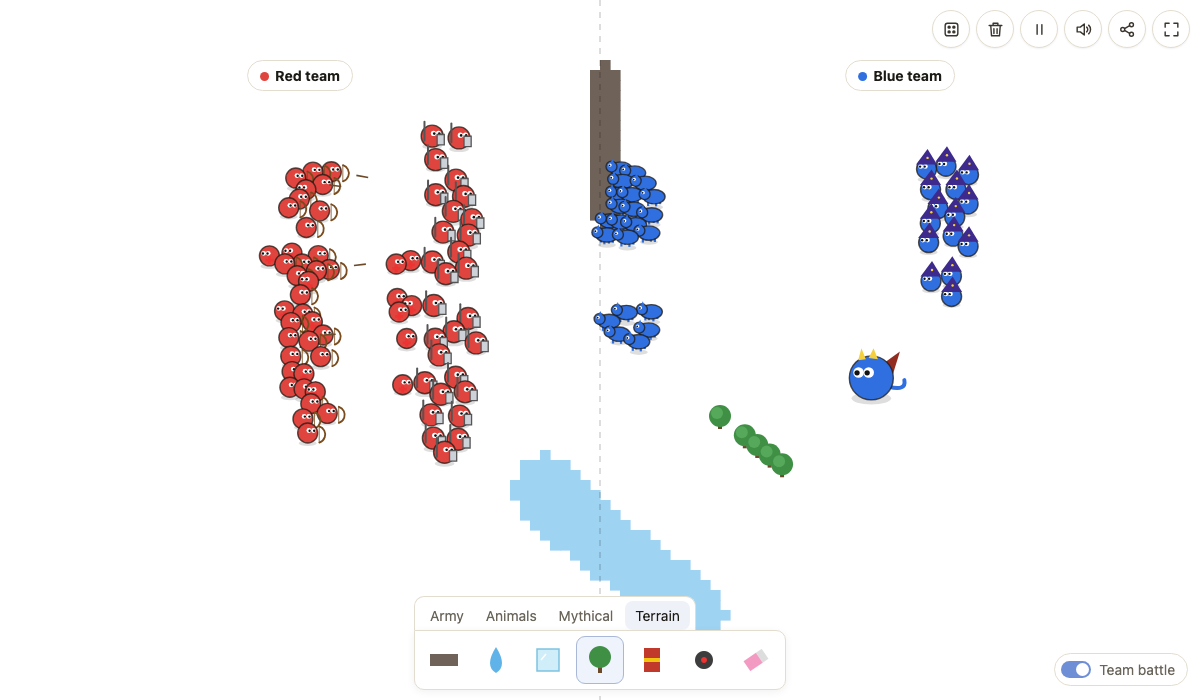
How to play Battle Draw
- Pick a unit. The panel at the bottom of the field has four tabs: Army, Animals, Mythical and Terrain. Hover over an icon (or tap it on a phone) to see what the unit does.
- Draw your army. Click and drag on the field. The circle around your cursor is the brush: one click drops a small squad, and dragging lays units all along your line. On a phone, drag with one finger.
- Draw the enemy. Pick a different unit and draw again. In normal mode every unit type is its own side, so soldiers fight wolves, wolves fight dragons, and so on. Units of the same type never fight each other.
- Watch the fight. Units find the nearest enemy and attack. The box in the corner counts who is still standing, and a banner announces the winner with buttons to play again, share the battle or start a random one.
- Shape the battlefield. Use the Terrain tab to add walls, water, ice, trees, explosive barrels and mines, or the eraser to remove anything.
Controls
| Action | Computer | Phone / tablet |
|---|---|---|
| Draw units or terrain | Click and drag | Drag with one finger |
| Pause / resume | Space or the pause button | Pause button |
| Start a team battle | Space or START | START |
| Clear the field | C or the trash button | Trash button |
| Sound on / off | M or the speaker button | Speaker button |
| Random matchup | Dice button | Dice button |
| Fullscreen | Fullscreen button | Fullscreen button |
Battle Draw team battle mode
Switch on Team battle in the corner of the field. A dashed line splits the field: everything you draw on the left joins the red team, everything on the right joins the blue team. Mix any units you like on each side, add terrain, and nothing moves until you press START. This is the mode for building real armies with a front line of knights, archers in the back and a dragon on the flank.
Battle Draw units
Battle Draw army units
| Unit | How it fights |
|---|---|
| Soldier | Medium range rifle shots. Cheap and reliable in large numbers. |
| Sniper | Very long range and one heavy hit per shot, but slow to reload and fragile up close. |
| Knight | High health and armor that cuts incoming damage. Slow, fights in melee. |
| Archer | Long range arrows; strong behind a wall of knights. |
| Ninja | Very fast melee attacks and a one-in-three chance to dodge a hit completely. |
| Cavalry | A fast rider whose first strike deals double damage. |
| Medic | Never attacks. Heals the nearest wounded ally on its side. |
| Bomber | Runs at the enemy and explodes, hurting everyone in the blast. |
Battle Draw animals
| Unit | How it fights |
|---|---|
| Boar | Charges in; its first hit deals double damage. |
| Wolf | Fast pack hunter that hits harder when other wolves are close. |
| Bear | Huge health and heavy swipes. Hard to bring down. |
| Crocodile | Slow on land but very fast in water. Draw a river and watch it hunt. |
| Snake | Weak bite that poisons, so targets keep losing health after the hit. |
| Cheetah | The fastest unit on the field. |
Mythical units in Battle Draw
| Unit | How it fights |
|---|---|
| Dragon | Massive health pool and a cone of fire that hits several enemies at once. |
| Wizard | Throws slow fireballs that explode on impact. |
| Zombie | Slow and weak alone, but every unit it kills rises as a new zombie on its side. |
| Slime | When a big slime dies it splits into two small, faster slimes. |
| Skeleton | Gets back up once after it falls. |
| Giant | Slow, huge, and smashes the ground to hit every enemy around it. |
Battle Draw terrain
Wall blocks units and bullets. Water slows most units but speeds up crocodiles. Ice makes units slide past their targets. Trees block the way. Barrels explode when shot, burned or caught in a blast, and can chain into each other. Mines explode when anyone steps on them. The eraser removes units, terrain and objects under the brush.
Battle Draw tips
- In Battle Draw, numbers matter more than you think: a long line of soldiers usually beats a short line of knights.
- Put knights in front and archers or snipers behind them; the knights soak damage while the shooters work.
- Medics only pay off in team mode, where they can heal a mixed army.
- Wolves are weak alone and scary in a big pack. Draw them in one thick clump.
- A wall in the middle turns any matchup into a ranged fight, because bullets and arrows cannot pass through it.
- Zombies win long fights. Kill a horde fast with wizards or a dragon before it grows.
- Draw a row of barrels in front of an army and let the enemy shoot them.
Share a battle with friends
When you have a setup you like, press Share. The link stores every unit, every wall and every mine on the field, so the person who opens it sees the exact same battle and can try to change the outcome. On phones the button opens your share menu; on a computer it copies the link.
Battle Draw FAQ
Is this the official Battle Draw by neal.fun?
No. This is an independent fan-made game with its own code and art, inspired by the idea of drawing armies and watching them fight. The original Battle Draw is made by neal.fun.
Can I play Battle Draw on my phone?
Yes. Drag your finger on the field to paint units. Use the fullscreen button for a bigger field.
Do I need to download anything?
No. It runs in your browser, free, with no sign-up.
How do I share a battle?
Press Share. You get a link that loads your exact armies and terrain for whoever opens it.
Which unit is the strongest?
One dragon or giant beats a small group of almost anything, but a large crowd of archers or snipers can bring it down. Zombies get stronger the longer a fight lasts because every unit they kill turns into a zombie.
Is my battle saved?
The field is not saved when you close the page. Use the Share button to keep a link to any battle you want to come back to.
Why does the game slow down?
Very large battles with hundreds of units are heavy for older phones. The field holds up to 900 units; clear it or draw shorter lines if it gets slow.
How does team battle work?
Turn on Team battle, draw the red army on the left half and the blue army on the right half, then press START. Nothing moves until you start, so you can plan your formation.